 Vocalizer
Keep the voices.
Lose the music.
Vocalizer removes the music from anything your Mac plays: videos, podcasts, streams and songs. It all happens on your Mac, as it plays.
What you hear. Flip the switch.
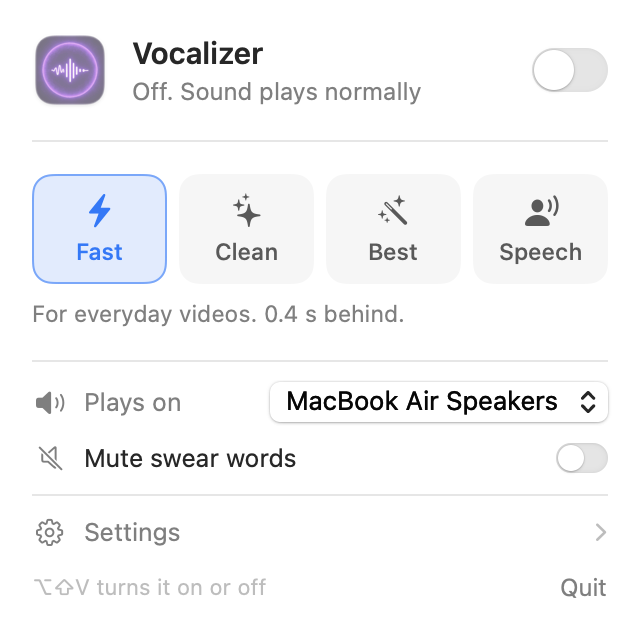
One switch in your menu bar.
Turn it on and every app plays without its music: YouTube in any browser, Apple Music, Spotify, podcasts, lectures, films. Speech, singing and dialogue come through clearly.
Turn it off and your Mac sounds exactly as before. Press ⌥ ⇧ V to switch it from anywhere.
Works with every app
Vocalizer works on your Mac's sound itself, so there's nothing to install in each app or browser.
Lips stay in sync
Video players hold the picture back by exactly the processing delay, so faces and voices line up.
Private by design
Audio is processed on your Mac's Neural Engine and GPU. It is never recorded, stored or sent anywhere.
Mute swear words
An optional switch silences swear words as they play, recognized on your Mac, with no extra delay. Needs macOS 26 or later.
Speakers and headphones
Plug in headphones or connect AirPods and the sound follows. Your volume keys keep working.
Signed and notarized
Signed with an Apple Developer ID and checked by Apple, so it opens without warnings. Free and open source.
Choose speed or quality.
Cleaner separation needs a little more time. With video sync on, the delay stays out of sight: the video simply starts a moment later.
Delay before you hear the voice, measured on an M-series MacBook with video sync on. Want it simpler? Turn on Fast only in Settings and the menu becomes one switch.
Ready in a minute.
Requires a Mac with Apple silicon (M1 or later) and macOS 14.2 or later.
Download
Download the zip and open it. Drag Vocalizer to your Applications folder.
Open it
Vocalizer lives in the menu bar as its waveform logo. For video sync, click Install in its menu and enter your password once.
Switch it on
Flip the switch, then click Allow when macOS asks about System Audio Recording. Play something.
Good to know.
Is it free?
Yes. Vocalizer is free and open source under the MIT license, and the source code is public.
Does it send my audio anywhere?
No. Separation runs entirely on your Mac. Vocalizer only goes online to check for updates (and download one when you say so), and to download the Best model if you choose it. See the privacy policy.
Why does macOS ask for System Audio Recording?
Vocalizer needs to hear what your Mac plays in order to remove the music. macOS asks once. Nothing is recorded or saved.
Why is there a delay?
The model needs a short slice of sound to tell voices from music. With video sync on, video players wait for the voices, so you won't notice it in videos. Games and calls do hear it; use Calls mode for those.
Does it remove every instrument perfectly?
It removes most music very well. Heavy reverb, backing vocals and choirs may leave traces. Try Clean or Best for the cleanest result.
Can I install it from the Terminal?
Yes. Paste this into Terminal: it downloads the latest version, installs the app and the video sync device (macOS asks for your password once), and opens Vocalizer.
curl -fsSL https://getvocalizer.com/install.sh | bash
How do I get updates?
Vocalizer checks for new versions every few hours. When there's one, a small note appears in its menu; nothing installs until you click Update…, see what changed, and choose Install. You can also right-click the menu bar icon and choose Check for Updates…, or turn on Install updates automatically in Settings if you'd rather not think about it.
Are updates safe?
Each update must carry Vocalizer's private signature and the same Apple Developer ID, so a fake or tampered update from a hacked server is refused, and Apple scans every release. What no updater can prove is that a developer stays trustworthy, which is true of every app that updates itself. Vocalizer only ever has one permission, System Audio Recording, and any new permission would make macOS ask you first. Every change is public on the releases page, and by default nothing installs without your OK.
Does it work on Intel Macs?
No. Vocalizer needs Apple silicon (M1 or later), because it runs its models on the Neural Engine and GPU.
How do I uninstall it?
Right-click Vocalizer in your Applications folder and choose Services › Uninstall Vocalizer, or just drag it to the Bin and Vocalizer offers to clean up after itself. You can also right-click its icon in the menu bar. It removes the app, its audio device, the downloaded models and its settings, and puts your speakers back to normal. From the Terminal you can also run curl -fsSL https://getvocalizer.com/uninstall.sh | bash.